
Commissioned Artwork Handoff Record: Match Approvals to Delivered Files
An approved illustration and a delivered export are not automatically the same asset. A commissioned artwork handoff checklist is complete when the record identifies the approved version, the delivered files, the checks performed, and any unresolved dependency.

Compare the approved artwork with the delivered files directly. A polished mockup can show placement and scale, but it cannot prove that the export contains the expected transparency, dimensions, outline, or cut-edge relationship.
What the Handoff Record Should Show
The record should answer one bounded question: do the delivered files match the artwork and conditions that were approved?
Record these items separately:
- The approved artwork version
- The approval date, message, or other identifying reference
- The delivered file names and file types as shown in the delivery
- The intended format or use being checked
- Visible differences between the approval reference and delivery
- Dependencies involving the contract, source terms, production, or marketplace requirements
- The person responsible for final confirmation
An approval reference should be specific rather than buried in an unnamed image or long conversation. A version label, dated preview, file name, or clearly identified approval message can work when the project record supports it.
This separates three states that are often confused:
- What was visibly approved
- What was actually delivered
- What still depends on an external requirement
Maintaining one approved reference and documenting its scope can reduce ambiguity. That is a useful handoff mechanism, not a universal artwork, contract, or production standard.
Identify the Approved Artwork Version
Start with the version the client or creator actually approved. Do not compare the delivery with an earlier sketch, a later working file, or a mockup that changed after approval.
Use a label another person can recognize, such as Forest_Cat_v03_approved or Planner_Motif_Set_A_approved_2025-04-12. The label improves traceability, but it does not establish ownership, licensing, or contractual acceptance.
Inspect the approval reference for the visible details that matter to the intended format:
- Motif count and arrangement
- Anchor motif silhouette and proportions
- Outline or border treatment
- Color relationships and contrast
- Text and internal details
- Supporting motifs and spacing
- Background or transparency appearance
- Any stated dimensions or format conditions
If an approval message says “approved” while also requesting a change, treat the change as unresolved until the record shows which version includes it. A general approval statement should not override a specific visible correction without clarification.
Run the Delivered File Comparison
Compare the approved reference and delivered file under consistent viewing conditions. Keep the scale, background, and display format similar so that visible differences are easier to isolate.
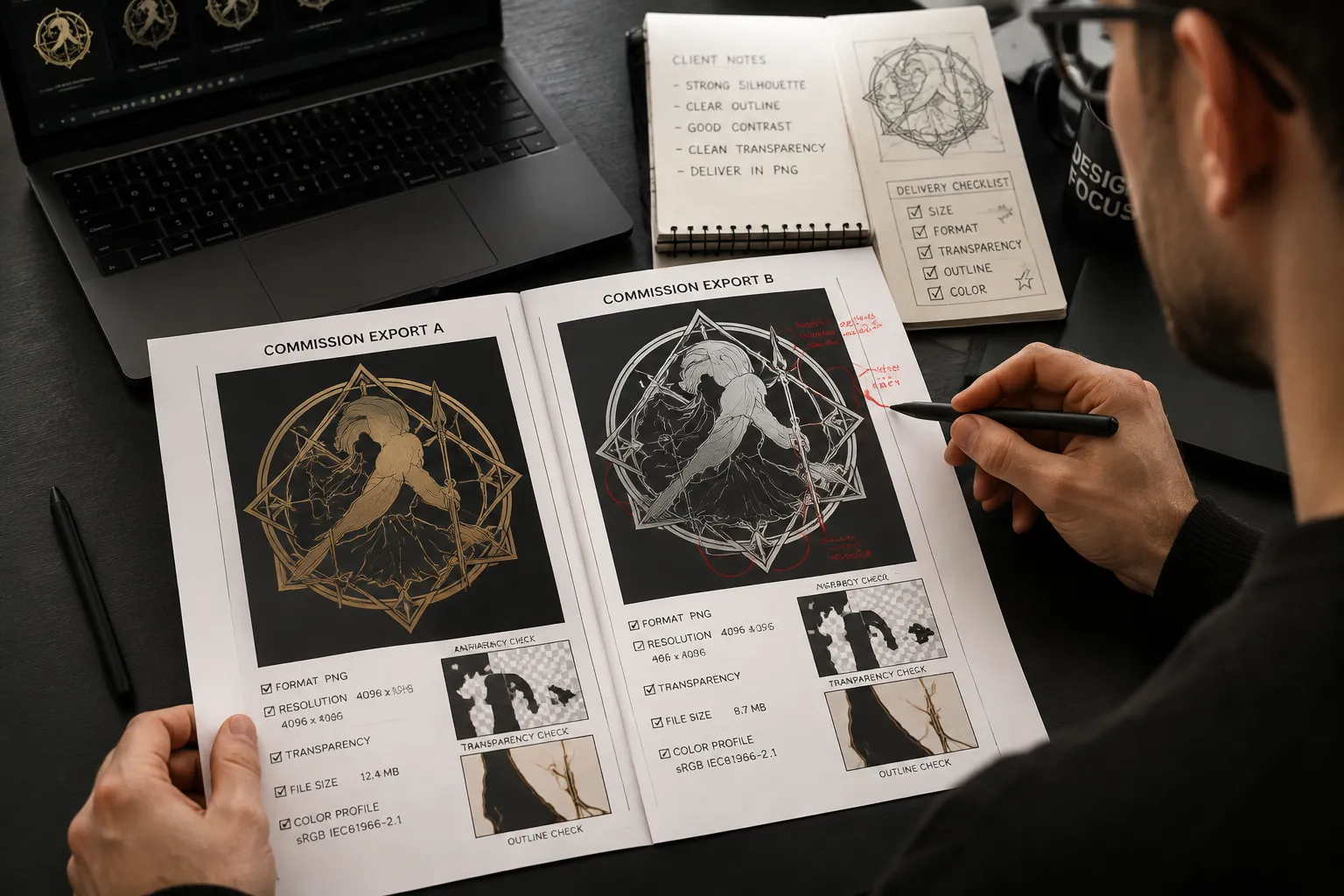
1. Compare the Motif and Silhouette
Check the main shape, pose, proportions, facial or internal details, outline thickness, border shape, and supporting elements.
Begin with the silhouette. A changed contour, missing part, or altered proportion is usually easier to identify than a small internal difference. Record that discrepancy before reviewing color or export properties.
A small change may be intentional when the source terms or intended format require a revision. Record the dependency instead of treating every difference as an error.
2. Inspect Color and Contrast
Compare visible color relationships rather than relying only on individual color values. Look for a changed background or fill, missing accents, weaker outline contrast, merged color areas, or a border that no longer separates the motif from its background.
A screen preview can reveal a difference without explaining its cause. The cause may involve the export, viewing application, color handling, or a deliberate revision. Record what is observed first, then identify what needs confirmation.
The approved preview shows a dark outer border. The delivered file appears to have a lighter border against white.
This gives the next reviewer something to inspect. “The colors feel wrong” does not.
3. Inspect Transparency and Background Behavior
When transparency matters, open the delivered file against a contrasting background. Check whether transparent areas remain transparent, an unintended background has appeared, edges show a halo, white details remain visible, and the delivered preview matches the approval reference.
Transparency is a file observation. Its suitability depends on the intended format and stated delivery requirements. A transparent export may fit one use and be unsuitable for another.
Transparent background is visible in the delivered export. Confirm it against the agreed listing or production format before closing the handoff.
4. Compare Dimensions and Scale
Inspect the dimensions shown in the delivered file or export information. Compare them with the approved dimensions or intended format when those details were stated.
Do not assume one dimension applies to every use. A sticker sheet, individual sticker, digital download, and listing preview may require different files or preparation steps.
Keep these observations distinct:
- Artwork dimensions
- Canvas dimensions
- Motif size within the canvas
- Resolution or export information shown in the file
- Dimensions required by the intended destination
Current printer, cutter, marketplace, and file-format requirements must come from the applicable contract, service documentation, marketplace documentation, or other primary source. The handoff record can mark those requirements as pending; it should not invent them.
5. Inspect the Cut-Edge Relationship
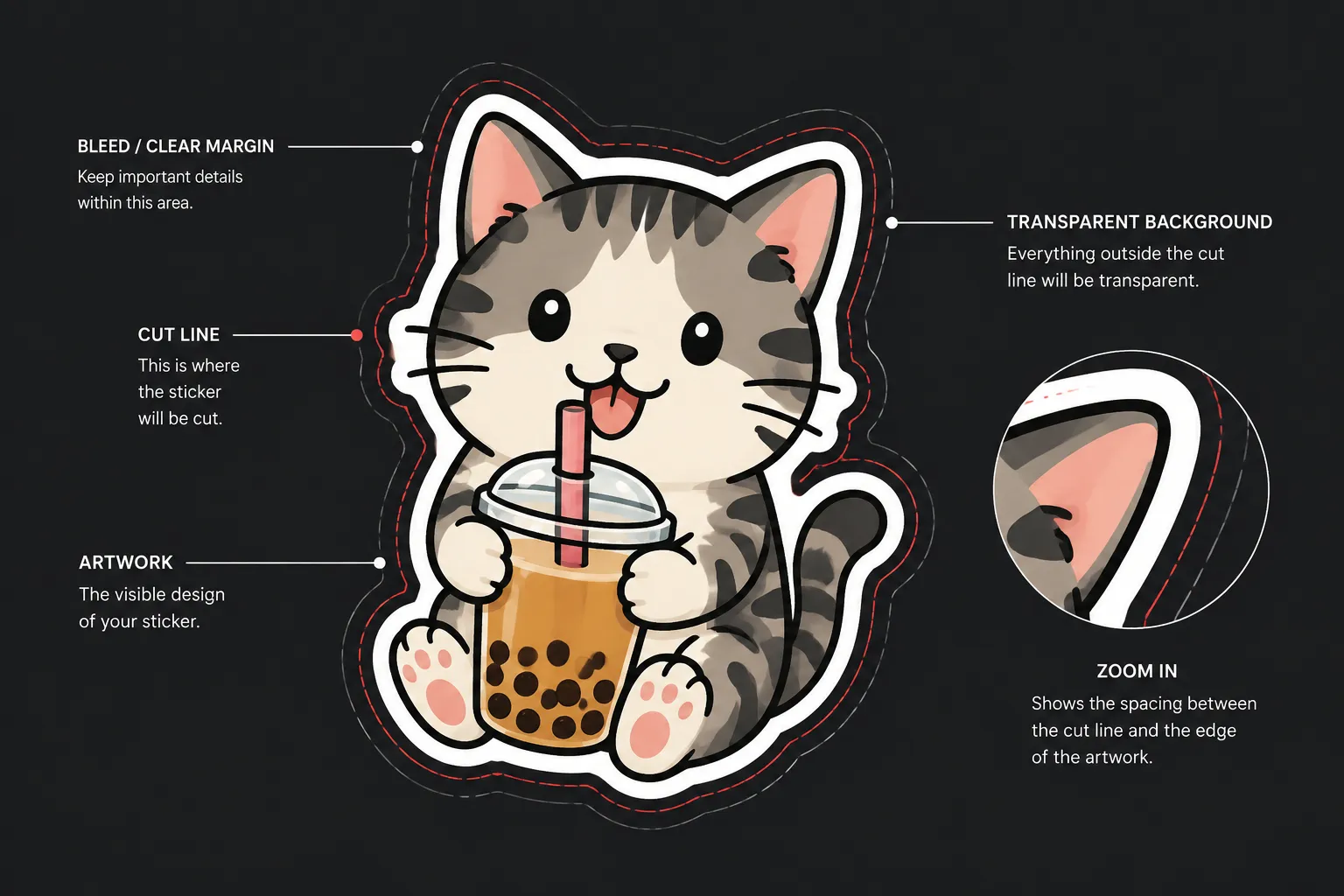
For sticker or decal artwork, inspect how the visible artwork relates to the intended cut edge. Check whether the outline remains visible, the border spacing is consistent where required, important details sit too close to the cut edge, and the delivered file represents the cut-related element shown in the preview.
“Clears the cut edge” should describe an observed relationship, not a physical-output guarantee. Cutting depends on the production method, material, equipment, service settings, and current provider documentation.
A mockup may suggest how a border appears on a product. It does not confirm the physical result by itself.
Compact Commissioned Artwork Handoff Checklist
Use this as a review record rather than a general sign-off phrase.
Approval Reference
- Approved file or preview identified
- Approval date, message, or version recorded
- Requested revisions separated from completed approvals
- Intended use or format stated where available
Visible Comparison
- Motif count and arrangement match
- Anchor motif silhouette and proportions match
- Supporting motifs, outline, and border treatment match
- Color relationships and contrast match
- Text, internal details, and spacing match
Export Inspection
- Delivered file names and types recorded
- Transparency inspected where relevant
- Canvas and artwork dimensions inspected
- Visible edge artifacts recorded
- Export differences separated from design differences
Intended-Format Comparison
- Intended format identified
- Scale checked against that format
- Cut-edge relationship inspected where relevant
- Production and marketplace requirements marked as pending when unconfirmed
- Source-term or contract dependencies recorded
Closing Record
- Each discrepancy marked resolved, accepted, or pending
- Revised files connected to a clear version label in the project record
- Final confirmation obtained from the responsible party
- Handoff status stated plainly
“Looks good” does not show what was checked. A more useful entry would state: “Approved version v03 compared with delivered PNG files; transparency and visible border match; dimensions pending printer documentation.”
Record Any Handoff Discrepancy
A useful discrepancy record contains four parts:
- Reference: Which approved version was used?
- Observation: What differs in the delivered file?
- Dependency: Does the difference depend on the contract, source terms, intended format, or production documentation?
- Action: Should the file be revised, clarified, accepted, or held?
Reference:
Botanical_Set_v02_approved.
Observation: The delivered export contains a white rectangular background, while the approved preview shows the motifs on transparency.
Dependency: Confirm whether the agreed delivery requires transparent artwork or a placed background.
Action: Hold the handoff until the format is confirmed.
This structure keeps a visible difference separate from a legal or contractual conclusion. It also gives the next reviewer a practical action.
Mark a discrepancy as accepted only when the responsible party has clearly accepted that specific difference. Silence, an earlier general approval, or a polished mockup does not confirm an unrecorded change.
Why a Mockup Is Not Enough
Mockups are previews of placement, scale, and presentation. They can help assess a proposed product view, but they do not replace inspection of the delivered artwork.
A mockup may conceal a background included in the export, a changed canvas size, missing transparency, an altered outline, an edge halo, repeated motifs, or details that disappear at the intended viewing size.
Inspect the actual delivered file separately. Then use the mockup only for the presentation question it can show.
Common Misunderstandings
“Approved” means every later file is approved
Approval belongs to the identified version unless the project record clearly extends it to later exports. A revised file needs its own comparison or confirmation when it changes visible artwork or delivery conditions.
Matching the picture proves the export is correct
A visual match does not confirm transparency, dimensions, file contents, or format-specific requirements. Inspect those properties separately.
A file name proves traceability
A descriptive name helps, but traceability depends on the surrounding record. Keep the approved reference, delivered version, and discrepancy notes connected.
A cutline preview proves cutting will work
It shows only the relationship represented in the preview. Physical output depends on the applicable production requirements and equipment documentation.
A general confirmation resolves every discrepancy
Confirmation should identify what was accepted. Record the particular version and difference so later revisions do not reopen the same uncertainty.
The Handoff Stopping Condition
Close the commissioned artwork handoff when the approved reference and delivered files agree within the stated scope, relevant export checks are complete, and every discrepancy is resolved, specifically accepted, or clearly held.
Before closing, confirm that the intended format is named and that transparency, scale, and cut-edge checks were completed where relevant. Do not assume contract, licensing, printer, cutter, or marketplace conditions from a visual match.
If one required point remains open, state exactly what is pending and who must confirm it. The record is then ready for the next production or listing review without presenting a mockup as final evidence.